

Anna Maria Cires explains how to design activities to teach sequence, selection and iteration to young learners
One of my favorite topics to teach is coding, and I enjoy helping children develop computational thinking. As I argued in the first article of this series, the best age to begin introducing programming is four-five years old, using unplugged coding activities. Introductory programming concepts will help pupils understand more complex programming concepts later in their education.
Each computer program is designed from building blocks. The three types of building blocks of a program are, in ascending order of difficulty:
- Sequence
- Selection
- Iteration
Here are some ideas to introduce these three building blocks to young learners.
Sequence
Sequence is the order in which the instructions of a computer program are executed and processed.
Common ways to introduce sequence are coding grids. Grids can be drawn by hand, printed or created from strips on a table, board, floor, or other surfaces of any size. The grid will show the children the space that can be used to make different movements. This space can be compared to some extent with the computer memory required for a specific program.
Next, we need a start and end point. Depending on the interests of those who will play, we could use a wide range of ideas. For example, Harry Potter must find the way to the magic book. In this case, we will need arrows, which the ‘programmer’ will place on the grid one by one, indicating the correct path. In fact, the arrows are their ‘code’. We can also use obstacles, which need to be avoided.
An additional task would be to record in one line the instructions (arrows) used in a separate sheet, notebook or on a board. This task will have benefits for future studies, for example, programming robots.
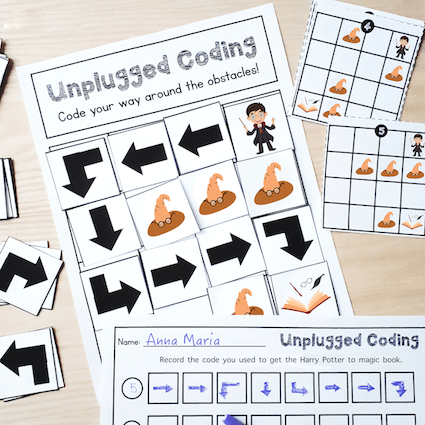
To summarize, to learn the concept of sequence, we need a grid, arrows and characters that will travel a path. An important part is debugging, giving children the opportunity to review the path in case it was indicated incorrectly.
Selection
The choice of activities that can be used to introduce the concept of selection in programming is very rich
In programming, there are often situations when it is necessary to make a decision. And the selected decision will be further processed by the computer. The process of making a decision is called selection. We can select one decision or another depending on a condition. The conditional statement “if… then….” changes how the code will be executed. For example, “<IF> it's raining <THEN> I will bring an umbrella”, and alternatively, if it doesn't rain, I won't take the umbrella.
The choice of activities that can be used to introduce the concept of selection in programming is very rich. These can be physical activities, practical activities on paper, or even fun conversations.
For physical activities, it is necessary to establish some conditions from the start. You can indicate them on a sheet and read them, with the conditional instruction <IF… THEN…>
Examples:
- IF the month of your birthday ends with an ‘R’ or an ‘H’, THEN jump up twice.
- IF your name starts with ‘A’ or ‘M’, THEN raise your left hand.
The list of instructions can be as long as you wish. As an extension, conditional instruction can be used: <IF…THEN…ELSE…>.
IF your name starts with ‘A’ or ‘M’, THEN raise your left hand, ELSE raise your right hand. Want to make it more challenging? Then kids should invent the part after <ELSE…> by themselves.
For conversations, it is easy to choose a subject where kids can make the right decision according to the condition. For example, the subject is how to cross the road safely. We start with a condition: “IF there is a red light” and the child continues “THEN I stop before zebra crossing”, “If there is green light”> “THEN I can cross the road only after all cars stop” etc.
In conclusion, to learn the concept of selection (conditional statements), we need a set of conditions and possible decisions. The construction "if...then...else..." is important because most programming languages have this concept almost unchanged in their structure.
Iteration
This last concept is more complex but very fascinating. There are cases when the program needs to repeat the instructions several times until a specific condition is met.
The instructions that should be repeated must first be recognized so that an efficient program can then be created. To teach this concept, it is crucial to develop children's ability to recognize patterns.
Depending on the level of knowledge and age of the children, games and exercises of different difficulty can be performed. An option can be a collection of objects placed on a surface or graphically represented on a sheet. For example, a group of dogs that have differences (colors, sizes, breeds) and similarities (ears, legs, tail). Questions can help children detect similarities and differences. If the objects are real (construction bricks, toy cars, fruits and so on), then the children, after detecting the similarities, can group them by color, size, height, and other categories.
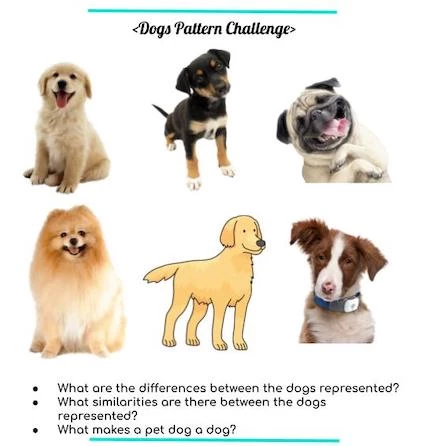
Such activities will introduce children to the basic concepts in a clear and accessible manner. They will develop their algorithmic, computational, critical thinking and the ability to solve problems from an early age.
After these activities, it is great to move on to the next stage – studying the above concepts in much more depth with the help of digital devices, namely visual programming languages. These are designed to allow children, even those who cannot yet read, to build block-based algorithms.
References and further reading
- - - - - - - -
How do you teach coding and programming to young learners? Do you have ideas or resources to share, or would you like to ask Anna Maria a question? Register for your free profile and leave a comment below!
- - - - - - - -
Publish with ISN - to share your ideas, insights or expertise with the ISN Community, please email your draft article directly to us at [email protected]